You are viewing an unreleased or outdated version of the documentation
Linking to asset definition code with code references#
Attaching code reference metadata to your Dagster asset definitions allows you to easily view those assets' source code from the Dagster UI:
- In local development, navigate directly to the code backing an asset in your editor
- In your production environment, link to source code in your source control repository to see the full change history for an asset
In this guide, we'll show you how to automatically and manually attach code references to your Dagster assets.
Prerequisites#
To complete the steps in this guide, you'll need:
- A set of Dagster asset definitions that you want to link to code
- Dagster version
1.7.6or newer
Automatically attaching code references to asset definitions#
To automatically attach code references to the asset's function definition, you can use the dagster._core.definitions.metadata.with_source_code_references utility. Any asset definitions passed to the utility will have their source file attached as metadata.
from dagster import Definitions, asset, with_source_code_references


@asset
def my_asset(): ...


@asset
def another_asset(): ...


defs = Definitions(assets=with_source_code_references([my_asset, another_asset]))
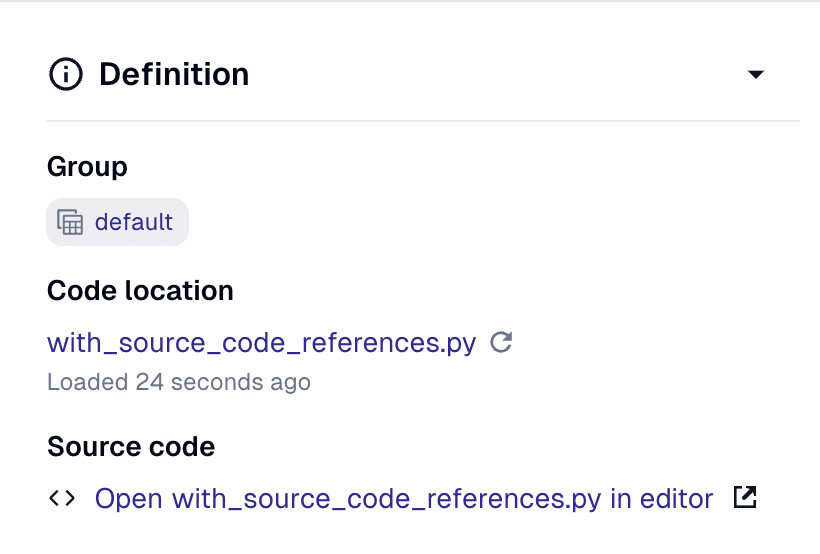
A link to the asset's source in with_source_code_references.py will then be visible in the Asset Catalog view in the Dagster UI:
Manually attaching code references to asset definitions#
In some cases, you may want to manually attach code references to your asset definitions. Some assets may have a more complex source structure, such as an asset whose definition is spread across multiple Python source files or an asset which is partially defined with a .sql model file.
To manually attach code references to an asset definition, use CodeReferencesMetadataValue. You can then choose to augment these manual references with with_source_code_references:
import os

from dagster import (
    CodeReferencesMetadataValue,
    Definitions,
    LocalFileCodeReference,
    asset,
    with_source_code_references,
)


@asset(
    metadata={
        "dagster/code_references": CodeReferencesMetadataValue(
            code_references=[
                LocalFileCodeReference(
                    file_path=os.path.join(os.path.dirname(__file__), "source.yaml"),
                    # Label and line number are optional
                    line_number=1,
                    label="Model YAML",
                )
            ]
        )
    }
)
def my_asset_modeled_in_yaml(): ...


defs = Definitions(assets=with_source_code_references([my_asset_modeled_in_yaml]))
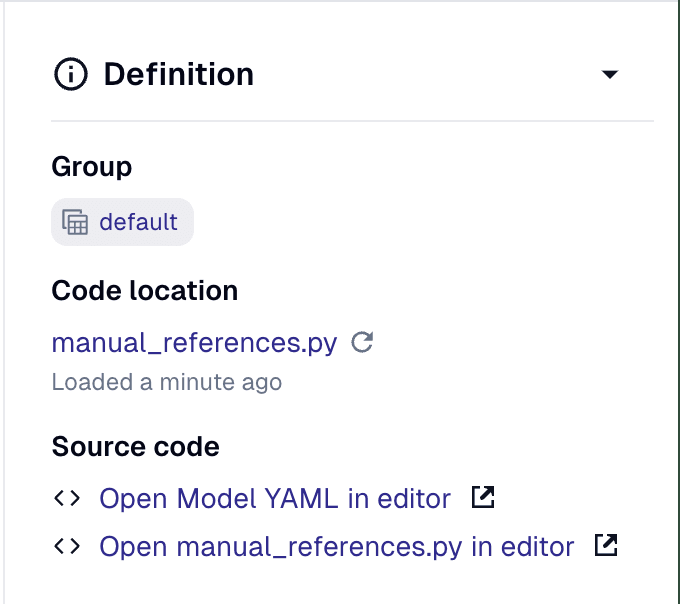
Each of the code references to manual_references.py will be visible in the Asset details page in the Dagster UI: